Friday, July 16, 2010

HTML Code for new Indian Rupee Symbol

Most of you must know that we got our own brand new currency symbol yesterday. It will surely be added to Unicode sometime in the future, but for now we are mostly stuck with using images or special fonts to display this on the computer. I just figured out an easy way to display this until we get our own Unicode character. Its pretty simple - the Devanagari "ra" (र) with a strike-through. It should look like र and its pretty close to what the symbol Here are some options for displaying it in HTML:
<del>&#2352;</del>
or
<del>र</del> in UTF8 text.

We can also use half "sa" and but it might not display properly everywhere. The earlier strike-through version looks closer to the real symbol (especially on IE). The code for half-sa is:
&#2360;&amp;#2381;&#8205;
and it looks like - स्‍

Just my र0.02. ;-) Hope you guys find it useful. By the way you should be able to copy and paste the symbols from here into Word or other applications which support formatting. You should be able to copy and paste the half-sa version into any application - even notepad if it displays correctly on your computer. But just remember that Devanagari Unicode could display differently on different computers.

Thursday, April 30, 2009

Tracing the spike... its on Mumbai Mirror!

Earlier this month, on 7th April precisely, visits on writeKA went up 400%. It has tapered down now though there are more visits on average now. It was strange because the increase was proportional across organic searches and direct visits. Now I know the reason. :D writeKA was featured on the Mumbai Mirror newspaper (in print). I don't know if coolsitetoday came first or that (the content is the same), but here's a link to the newspaper's online edition. Now I am all enthusiastic to put out more features again... :-) If anyone has a copy of the print, could you save it and give it to me?

Wednesday, April 8, 2009

writeKA is the cool site of the day

writeKA has been featured as the cool site of the day on CoolSiteToday - heres the direct link - http://www.coolsitetoday.com/?coolid=1239042600.

Sunday, March 1, 2009

writeKA on Twitter

Like everyone else these days, writeka has joined the twitter bandwagon. Follow the latest updates here - http://twitter.com/writeka.

Sunday, April 20, 2008

Top Gadget Developer #53

Hey - I'm on the top Google Gadget Developer list at number 53... By the time you look - http://www.google.com/ig/authors?hl=en&gl=us&rl=en_us&start=52&sa=N, it is possible that my rank has changed or I'm not on the list at all! The ranking is very dynamic and is dependant on the number of active users of a developer's gadgets when the ranking is done. Anyway, I'm happy to be on it even for a short time! :-)

Friday, April 4, 2008

News in Gujarati and Punjabi

I've added two more languages to the Indian Language News portal - Punjabi and Gujarati. Check them out:
Punjabi News
Gujarati News
You can also add the corresponding Google Gadgets to your website or iGoogle.
Add Punjabi News to iGoogle
Add Gujarati News to iGoogle
I'll be adding more news sources as I make the news engine better. Do give me your feedback.

Sunday, March 9, 2008

Indian Language News Gadgets for Google

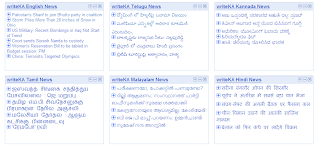
I know its been a long time since my last post. I've been busy with stuff other than writeKA. This weekend, however, I just sat and did some changes to writeKA's Indian Language News portal and also made some new Google Gadgets that display news in English, Hindi, Malayalam, Tamil, Telugu and Kannada. Google Gadgets can be added to your iGoogle page or your website.

Add English News to iGoogle
Add Hindi News to iGoogle
Add Malayalam News to iGoogle
Add Tamil News to iGoogle
Add Telugu News to iGoogle
Add Kannada News to iGoogle

This is how it looked when I was testing the widgets today:

The widgets allow you to change the number of news items you want to see and also the font size. You can change these parameters in the Widget Settings as shown in the image below.

Each news item can be expanded to see the source of the news and also a short description of the news. As always, please do send me your feedback.